
Most of the DNS problems I get called about don’t announce themselves as DNS problems. They show up as “the server is unreachable,” “the backup job failed overnight,” or, in the case I’m about to walk through, “the backup job succeeded, but something’s wrong with the data.” My dns troubleshooting workflow exists because by the time someone brings me one of these, the symptom and the actual cause are usually two or three layers apart.
I work across both Windows DNS and Linux, mostly BIND, depending on the client environment. The tooling differs a little, but the order I work through a problem doesn’t change much between the two.
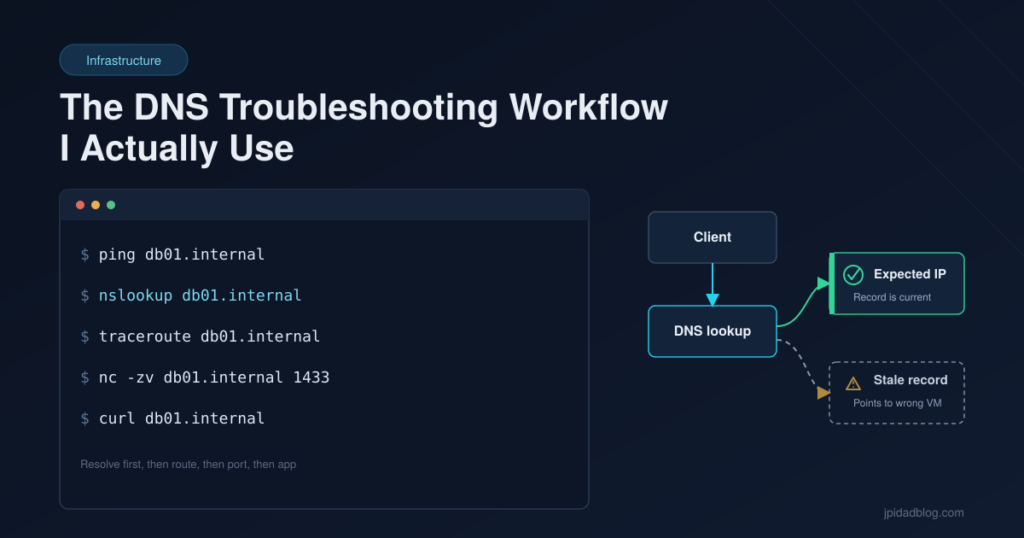
The Order I Actually Work Through
I don’t reach for anything fancy. In roughly this order:
- ping — not really a DNS check, but a fast sanity check on whether anything responds at all. If ping is blocked by a firewall, that’s a data point too, not a dead end.
- nslookup (or
digon Linux) — this is the actual DNS check. What does the name resolve to right now, and does that IP match what I expect it to be? This is where most of the real problems get caught. - traceroute — once I know the resolved IP is correct, I check whether the path to it looks the way it should. This catches cases where DNS is telling the truth but routing or a firewall rule is the actual blocker.
- nc (netcat) — with the IP and path confirmed, I test the specific port. Is anything actually listening where I expect it to be?
- curl — last, once the network layer checks out, I go up to the application layer and see if the service itself is responding the way it should.
The logic is simple: work from “does the name point to the right place” up to “does the application actually answer.” Skipping straight to curl when the real problem is a stale DNS record just gets you a confusing error message with no clue about where it’s actually coming from.
The Incident: A DNS Record Nobody Had Touched in Years
The clearest example I have of why step two on that list matters more than people give it credit for happened on a Linux server that had been running fine for a long time — which, in hindsight, was part of the problem.
The symptom looked completely unrelated to DNS. A NetBackup job that was supposed to be backing up one specific VM was, instead, quietly grabbing a different VM’s data. The job itself wasn’t failing — it was completing successfully, which is exactly what made it dangerous. Nobody gets an alert for “backed up the wrong thing.” You only notice when you actually need that backup and it isn’t what you expected.
When I dug into it, the root cause was local DNS entries on that Linux server — the kind set once, at build time, and then never revisited. Over the following months and years, IP addresses in that environment had shifted as the infrastructure evolved. The problem was that nobody had a process for going back and updating those local records when an IP was reassigned. There was no change-management step that said “if you move this VM’s IP, go check what still points to the old one.” So the hostname NetBackup was targeting had quietly drifted, at the DNS resolution level, to point at a completely different machine than the one it was built to protect.
The fix, once I found it, was straightforward but not painless. I had to delete the existing backup images that had been created against the wrong target — they weren’t protecting anything they claimed to be protecting, so keeping them around was worse than useless. Then I updated the local DNS entry to point at the correct IP, confirmed it with nslookupagainst the actual current IP assignment, and ran a full backup job from scratch to establish a clean, trustworthy baseline. It cost us a backup cycle and some cleanup time, but the alternative — finding this out during an actual restore — would have cost a lot more.
The Mistake Pattern I See Over and Over, Across Different Clients
Some DNS mistakes are easy to catch. A typo’d IP address, a mistyped URL — those tend to fail loudly and immediately, and whoever made the change usually finds it within the hour because something obviously breaks.
The pattern that actually costs time is quieter: old or duplicate DNS entries that never got cleaned up when something was decommissioned, replaced, or reassigned. You end up with two records that used to both be correct, and now only one of them is — but nothing forces anyone to notice, because whichever one gets used depends on caching, which resolver answers first, or which record happens to still be valid at that moment. The result is access that fails intermittently, which is close to the worst kind of problem to troubleshoot, because it’s hard to reproduce on demand and easy to write off as “probably just network flakiness” the first two or three times it happens.
I’ve seen this same shape of problem — stale records left behind after a change, nobody circling back to clean them up — across more than one client environment. It’s less a technical failure than a change-management gap. The DNS server did exactly what it was told; the problem is that what it was told stopped being true a long time before anyone noticed.
Where Active Directory Fits In (and Where I Stop)
I’ll mention this much and no further, since AD itself isn’t something I get into on this blog: in the environments I manage, the parent company’s Korean headquarters runs an Active Directory-integrated DNS setup. The local subsidiary sites I work with don’t run their own authoritative DNS server — they pull DNS data read-only from that headquarters environment. That matters for troubleshooting because it means a resolution mismatch between a local site and headquarters isn’t necessarily a local misconfiguration; it can be a sync or replication timing issue further upstream. Knowing that boundary exists is enough to keep you from chasing a local fix for a problem that isn’t local. Beyond that, AD’s own internals are out of scope here.
Lessons Learned
- DNS troubleshooting is “trust, then verify,” not “trust.” A record being correct when it was created tells you nothing about whether it’s still correct today.
- Stale entries are a process problem wearing a technical disguise. The fix for one bad record is five minutes. The fix for the pattern is a change-management habit that revisits DNS whenever an IP changes.
- Work bottom-up. Name resolution, then routing, then port, then application. Jumping straight to the application layer skips the step that’s most likely to actually be the problem.
- A job that completes successfully isn’t the same as a job that did what you think it did. The NetBackup incident never threw an error. It just quietly protected the wrong thing until someone needed it not to.
Frequently Asked Questions
Do you need Active Directory to explain DNS issues like this?
No. This particular incident and the pattern behind it live entirely at the local DNS record level — local /etc/hosts-style or BIND entries that drifted out of date. AD-integrated DNS exists further upstream in this environment, but it wasn’t the cause here, and I’m intentionally not getting into AD internals on this blog.
What’s the very first command you run when a service can’t reach another server?
ping, mostly as a fast sanity check — but the command that actually tells me something useful is nslookup (or dig). It confirms whether the name is resolving to the IP I actually expect, which is where most of these problems turn out to live before I ever get to routing or the application itself.
Related reading:
- Not every backup problem is a NetBackup problem. I’ve also written about the day our backup server went down for a very different reason — worth comparing against this one.
- This same kind of stale-record problem showed up again during a cloud recovery test — see We Fixed the Firewall Rule. AWS Authentication Still Failed. for the VM mix-up it caused mid-test.