
In part one, I upgraded PHP on the Zabbix web server after PHP2Shell. The database servers and proxies had PHP packages installed too. On one database server, PHP-FPM was installed but not running, and I considered whether to remove PHP-FPM instead of patching it. A dry run listed 23 packages, so I didn’t.
Nothing was removed on that server. On the proxies, where nothing needed PHP, I did remove it.
What Was on the Database Servers
Both database servers had PHP 8.0.30 packages installed. PHP-FPM was running on one of them and inactive on the other, and the inactive one is where the rest of this story happens. Both servers also had Zabbix web packages installed, which I didn’t expect on a database server.
I couldn’t tell why they were there. My guess is that the database and web roles were meant to share a server at first, or that the packages came along with an installation, but I couldn’t confirm either. On the second server, httpd was running and PHP-FPM wasn’t:
systemctl is-active php-fpm
inactive

systemctl is-enabled php-fpm
disabled
I also checked which PHP packages were there:
rpm -q php php-cli php-fpm
package php is not installed
package php-cli is not installed
php-fpm-8.0.30-1.module+el8.8.0+20302+42d2b711.x86_64
On RHEL the php package is the one that ships the Apache module, so with php not installed, httpd had no PHP module to load from these packages. PHP-FPM was the only PHP runtime installed on that server.
The Dry Run
Before patching, I looked at removing PHP-FPM entirely on the second server, since an idle service is one less thing to maintain. I ran a dry run there:
dnf remove php-fpm --assumeno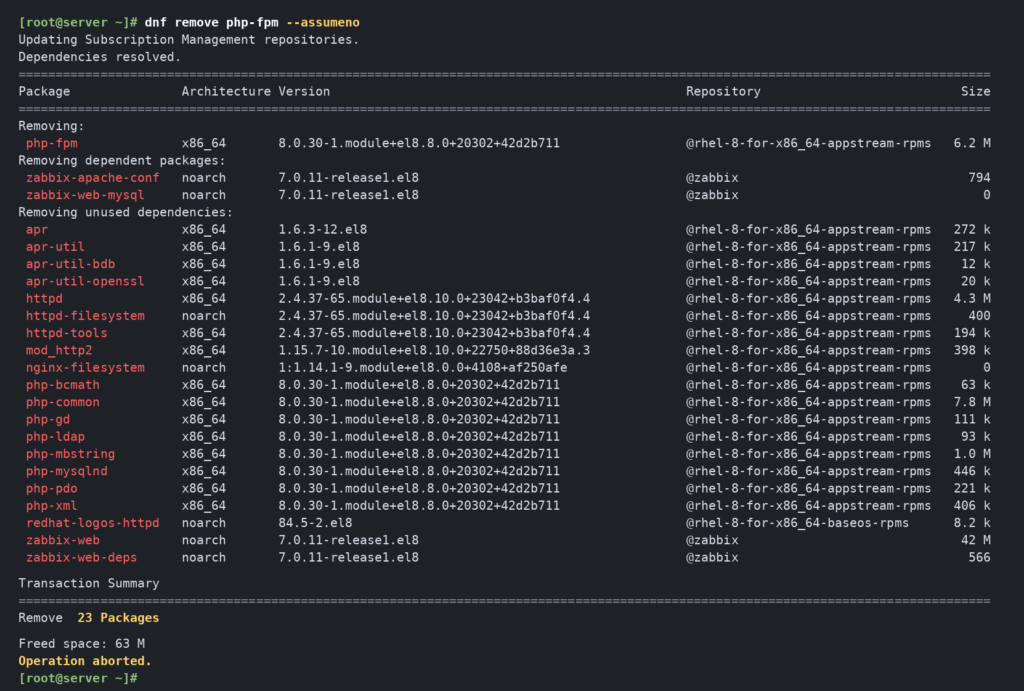
The transaction didn’t stop at php-fpm. dnf split the 23 packages into three groups:
- Removing:
php-fpm - Removing dependent packages:
zabbix-apache-confandzabbix-web-mysql, which require it - Removing unused dependencies (20 packages):
httpdwith its supporting packages (httpd-filesystem,httpd-tools,mod_http2, theaprpackages and a few others),php-commonwith seven PHP extensions (php-bcmath,php-gd,php-ldap,php-mbstring,php-mysqlnd,php-pdoandphp-xml), pluszabbix-webandzabbix-web-deps
The summary said Remove 23 Packages, Freed space: 63 M, and the last line was Operation aborted. Nothing was removed. Taking out the Zabbix web components and httpd as a side effect of cleaning up an idle service wasn’t a change I meant to make, so I stopped there.
Updating Without Changing the Service State
I then updated the PHP packages on both database servers from 8.0.30 to 8.3.36 without changing which services were enabled or running. A package that’s installed still needs the patch even when its service is off, and I didn’t start a service just to update it. On the second server, PHP-FPM stayed stopped and disabled. On the server where PHP-FPM was running, services were normal after the update.
The final state on the second server was PHP packages at 8.3.36, with php-fpm inactive and disabled. The Zabbix web packages and the running httpd stayed as they were. I plan to clean up that web stack later, but not as part of this change.
The Proxies
A Zabbix proxy doesn’t run the frontend, and Zabbix describes PHP as a frontend dependency, so a proxy has no reason to need it. Five of our 17 proxies had PHP installed anyway, all of them running Ubuntu. I checked each one before changing anything:
dpkg -l | grep -i phpThen I simulated the removal:
apt -s purge 'php*'Because 'php*' is a pattern, I read the simulated list on each proxy to see whether anything other than PHP packages was in it. Nothing was, and the result was the same on all five. After that I removed PHP on all five.
On some of them, dpkg -l still showed this:
rc php-commonrc means the package was removed but its configuration files are still there. I purged those as well. Afterward, dpkg -l | grep -i php returned no matches, so no PHP packages remained in the package list.
I also checked each proxy for leftover PHP processes and confirmed the proxy service was still running:
ps -ef | grep '[p]hp'
systemctl status zabbix-proxy --no-pager
Where Each Server Ended Up
| Role | Before | Action | After |
|---|---|---|---|
| Web server | PHP 8.0.30, in use by the frontend | Upgraded (part one) | PHP 8.3.36, running |
| Database servers | PHP 8.0.30 packages | Package update only | PHP 8.3.36; services normal, PHP-FPM state unchanged |
| Proxies (5 of 17) | PHP installed, not needed | Removed and purged | No PHP packages in dpkg -l |
| Main servers | Checked | None | Unchanged |
What the Dry Run Changed
On the second database server, removing PHP-FPM looked like a small cleanup until the transaction showed httpd and the Zabbix web packages in the list. That was enough to change the plan from removing to patching, and the web stack is still there to deal with separately.
Related reading: part one covers the web server upgrade and why dnf check-update showed nothing at first.
Frequently Asked Questions
Is it safe to remove an unused PHP-FPM package with dnf?
It depends on what else depends on it. dnf remove also removes packages that require the one you name and, by default, dependencies that nothing else needs. On one of our Zabbix database servers, removing php-fpm would have involved 23 packages, including httpd and the Zabbix web packages. Run dnf remove <package> --assumeno first to see the full list before you commit.
What does “rc” mean in dpkg -l output?
It means the package has been removed but its configuration files remain on the system. apt purge <package> removes the configuration files as well. On our Ubuntu proxies I purged them, and afterward dpkg -l | grep -i php returned no matches.